A process map where every step links to its evidence
Interviews become a navigable map: an overview of all processes, then each one in detail, step by step. Click a step to see the findings and evidence behind it.
- An overview of all processes, then a detailed graph of each
- Volumes and durations as ranges, with their sources
- BPMN 2.0 export for every process
The starting point
A diagram that asserts without showing
A traditional audit deliverable contains flowcharts drawn by hand from the consultant’s notes. It says a step takes two days, without saying who said so or on what basis. The moment the client has a doubt, someone has to dig the source out of pages of notes.
From the big picture to a single step
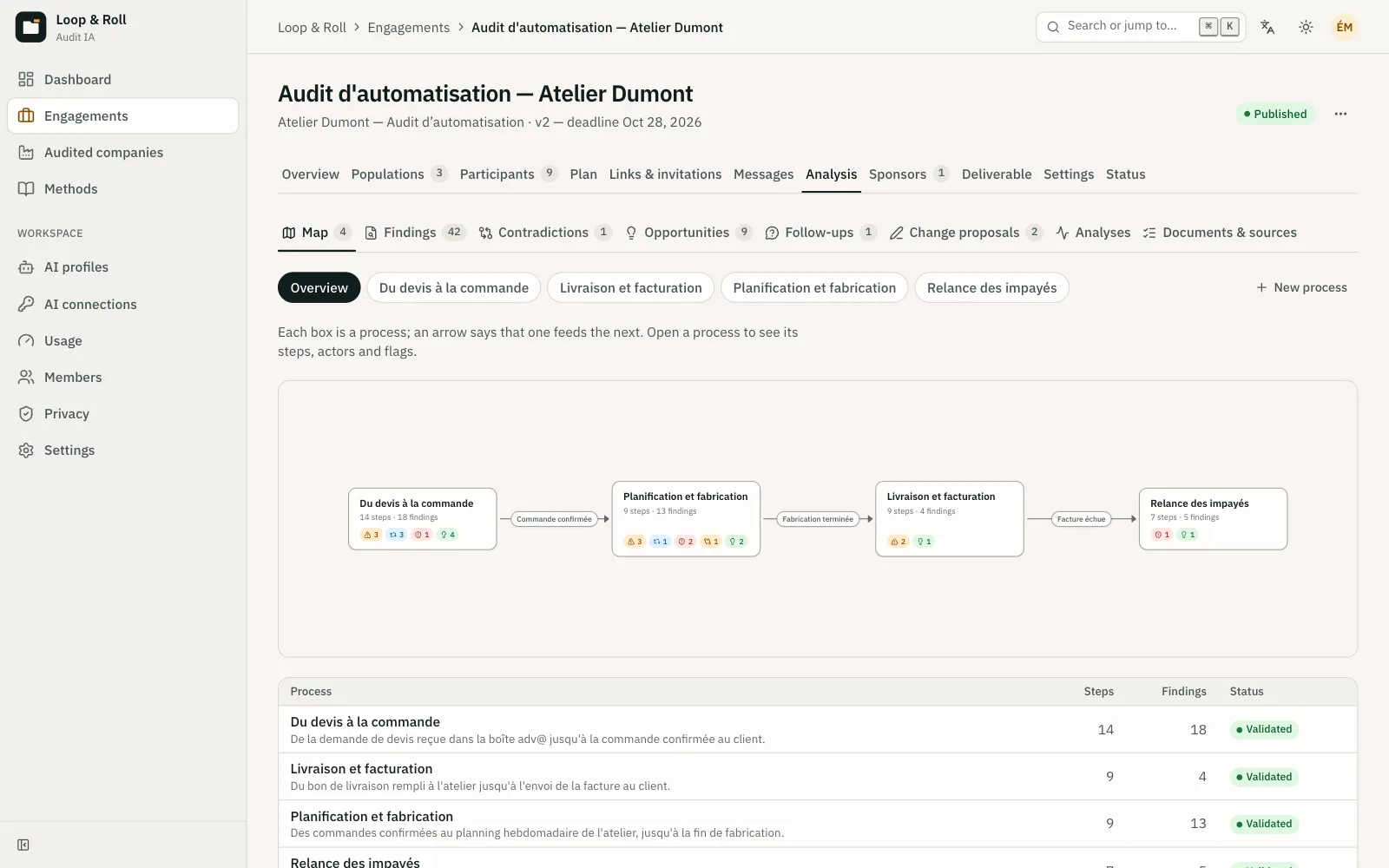
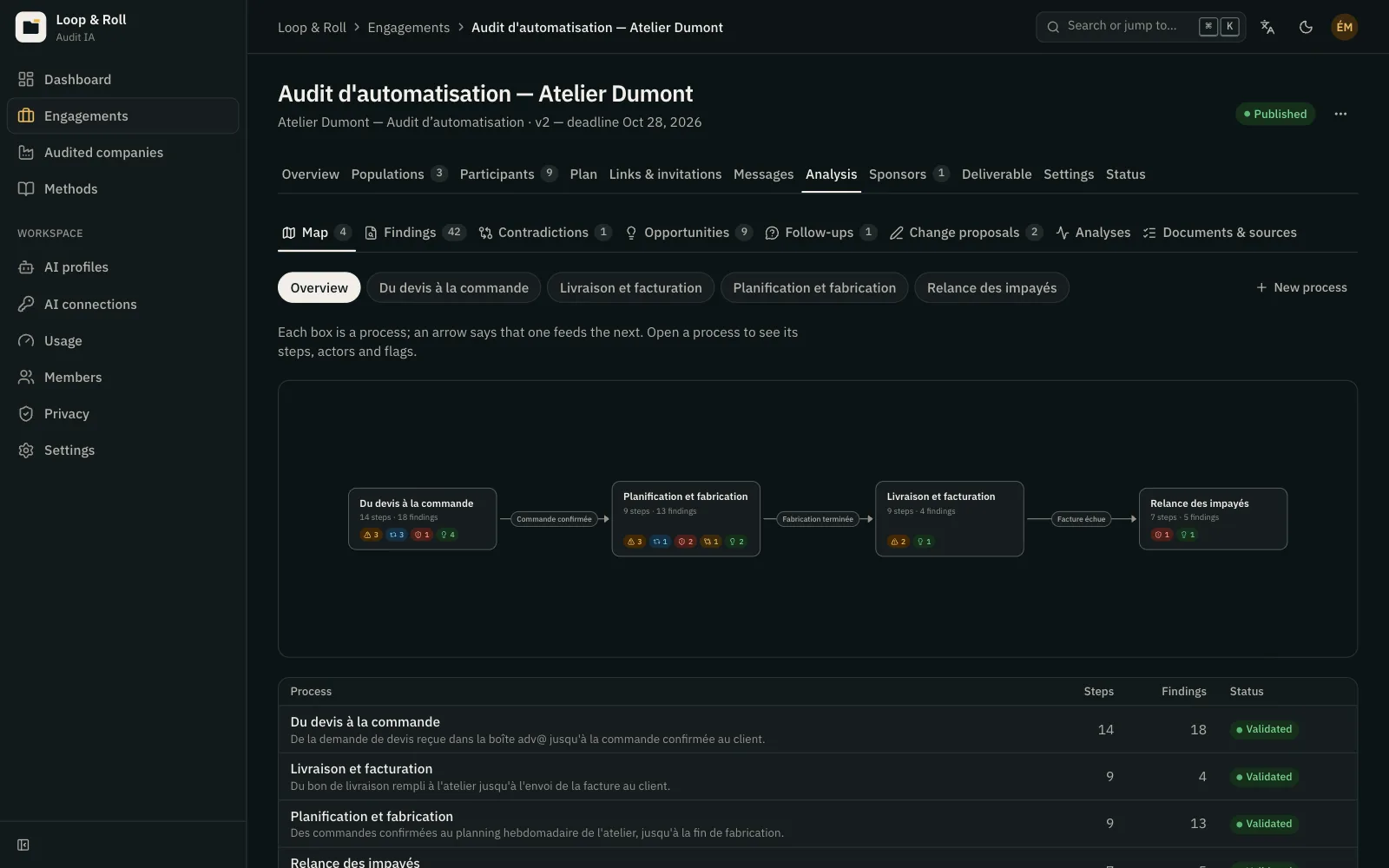
The overview shows the company’s processes and how they connect: quotes feed orders, which feed invoicing. Each process opens as a graph of steps. A step shows the actor by role, the tool used, the input and output, and the estimated duration and volume.
- Volumes and durations are given as ranges with sources: “30 to 50 orders a day, according to 3 sales admin participants and the CRM export.”
- Actors are roles, never people’s names.
- Decision points and waiting steps appear as such in the graph.
Friction, visible at a glance
Badges on each step flag what the analysis found: pain point, re-keying, risk, contradiction, opportunity. Swimlanes can be set by actor or by department, to show who steps in when. Alternative paths, such as “key account” or “rush order,” appear as labeled branches.
- Re-keying from the CRM into the ERP shows up on the exact step where it happens.
- Swimlanes reveal back-and-forth between departments, for example between sales admin and accounting.
- A variant doesn’t hide the main path: both stay readable.
One click to the evidence
Clicking a step opens its panel: description, findings, evidence, and related opportunities. Evidence can be an audio excerpt with its transcript, a screen capture, a pin, or a page in a file. Clients can hear the sentence behind a figure instead of taking it on trust.
- A step without evidence can be neither validated nor published.
- Sponsors see only the evidence the consultant selects, never full recordings.
- The map updates with every validated interview and every follow-up.
A map the consultant stays in charge of
Layout is automatic, so there are no boxes to align by hand. The consultant renames, merges, splits, moves, or adds steps. Those edits are protected: a new analysis doesn’t overwrite them, it proposes changes for the consultant to accept or decline.
- A merge or deletion proposed by the analysis always waits for the consultant’s approval.
- Positions adjusted by hand are kept.
- Each process exports to BPMN 2.0, with one lane per actor, for the firm’s modeling tools.
In practice
- Views
- An overview of processes and their links; a graph of steps for each process.
- Step
- Actor (role), tool, input, output, estimated duration and volume as ranges, findings, and evidence.
- Badges
- Pain point, re-keying, risk, contradiction, opportunity.
- Swimlanes and variants
- Swimlanes by actor or by department; alternative paths as labeled branches.
- Editing
- Rename, merge, split, move, or add a step; edits are protected from later analyses.
- Exports
- BPMN 2.0 per process; findings and opportunities as CSV or JSON; a printable version of the deliverable.
Frequently asked questions
How is the process map built?
The analysis rebuilds processes from the engagement’s validated recaps, pins, files, and external sources. Each validated interview enriches the map, and the consultant reviews and corrects it before publishing.
Can the map be edited by hand?
Yes. The consultant renames, merges, splits, moves, or adds steps. These edits are protected: a new analysis proposes changes to accept and overwrites nothing.
Can we take the processes into a modeling tool?
Yes. Each process exports to BPMN 2.0, with one lane per actor, decisions as gateways, and tools, inputs, and outputs as documentation. The file opens in modeling tools that support BPMN 2.0.
Where do the volumes and durations come from?
They come from interviews, files, and external sources, and are shown as ranges with their sources. A figure that is too uncertain can trigger a targeted follow-up with the participants concerned.
Does the client see the same map as the consultant?
The sponsor sees the map published in the deliverable, frozen at a version, with the evidence the consultant selected. They see neither full transcripts nor raw recordings.
Related features
- Cross-analysis Every interview cross-checked into sourced findings, with contradictions and follow-ups to resolve them.
- Deliverable and chat A published space for the sponsor, where every finding links to its evidence and the audit answers questions.
- Screen sharing The AI interviewer asks “show me” and sees the shared screen, where the work actually happens.
Use cases where it matters
- Organizational consulting An organizational diagnosis informed by every employee, with a process map that shows its sources.
- ERP / CRM integrators Requirements gathering grounded in how current systems are really used, with BPMN export.
- Order to cash Audit the sales chain from quote request to overdue invoice follow-up, one team at a time.
- Employee onboarding Audit how new hires are brought on board, a process where everyone sees only their own part.
- Field services Audit field operations with technicians who are rarely at a desk, straight from their phone.
See a complete audit in thirty minutes.
A voice interview with screen sharing, the process map it produces, the deliverable the sponsor reads: on a demo engagement, with your questions.