The cost of every engagement, tracked as it happens
Your workspace shows what each interview, each engagement, and each AI use consumes. Caps and alerts prevent surprises, and you price your audits on your own figures.
- Cost per interview hour, per engagement, and per use
- Caps per session and per engagement, monthly budget per workspace
- Tests and trials shown separately from engagements
The starting point
Pricing an audit by gut feeling
An audit run with AI has a variable cost: minutes of voice, screen images, analysis. Providers bill in tokens, seconds, or characters, and their prices change often. Without tracking, a firm prices its engagement by gut feeling and discovers its margin at the end.
What an engagement costs, no math required
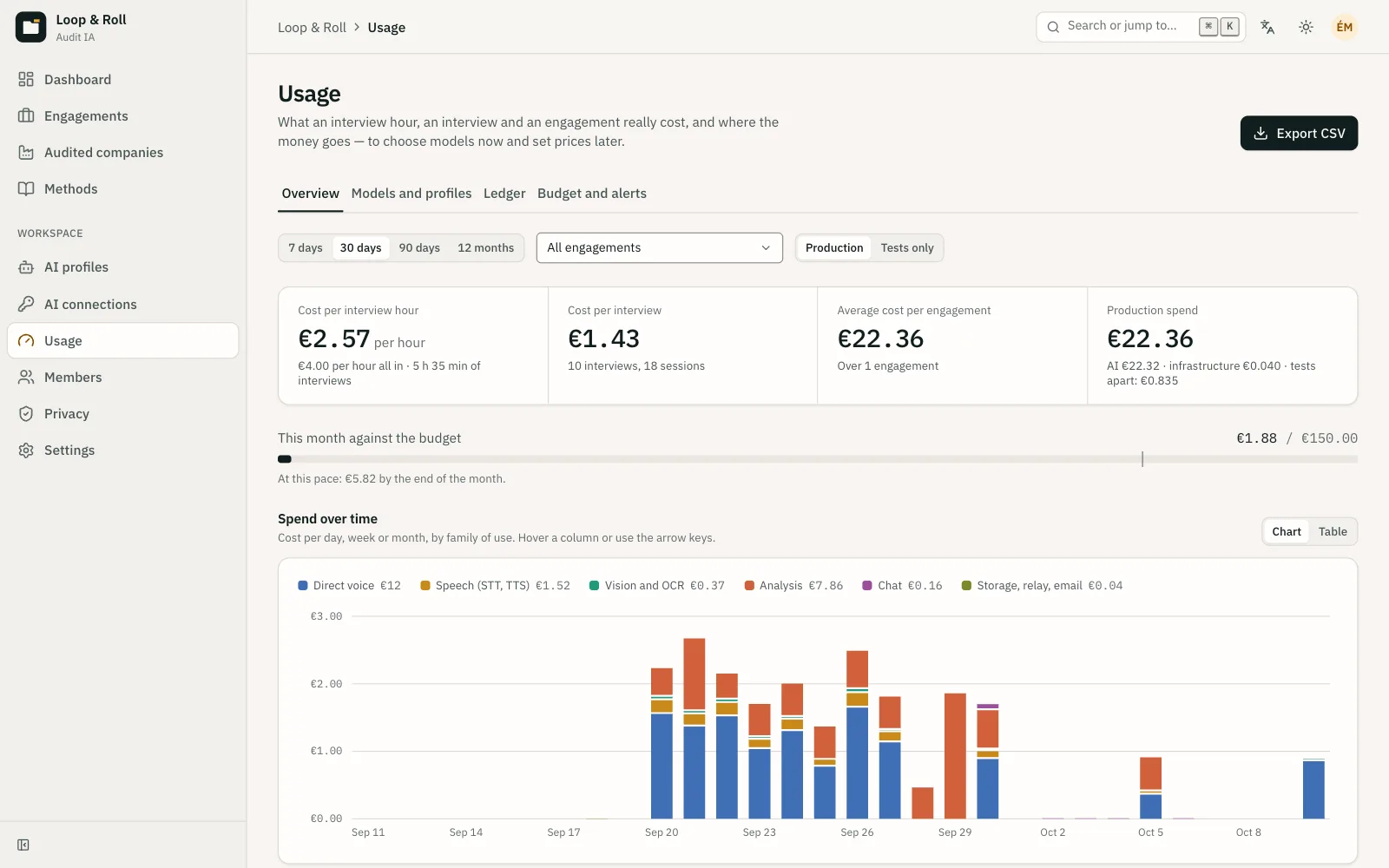
The dashboard answers a partner’s questions: what does an interview hour cost, a full interview, an end-to-end engagement? It breaks spending down by use, provider, and model, so two configurations can be compared on the same basis.
- Cost per interview hour, collection only or including analysis.
- Cost per interview, per engagement, and per use: voice, transcription, vision, analysis, chat.
- The key used is shown: the firm’s or the platform’s.
Costs that stay put
Each cost is calculated at the price in force on the day of the call, then kept as is. When a provider changes its prices, your past costs remain the ones you actually incurred. A simulation at current prices is still available, separately.
- Prices tracked by provider, model, and date.
- Model with no known price: a cautious estimate, flagged as such.
- Costs expressed in euros.
Tests do not skew your figures
The interviews you run to check your guide, AI profile tests, and Voice Lab trials are shown separately. The cost of an engagement reflects only the engagement.
- Test interviews excluded from the analysis and from engagement costs.
- Voice Lab trials grouped with their cost.
- CSV export of all usage, for your own calculations.
Caps before surprises
Each engagement can carry a cap per session and a cap for the whole engagement. Once a cap is reached, new calls are refused rather than letting spending run on. A monthly budget per workspace alerts admins by email.
- Rate cap on images sent to the vision model.
- Alert when a provider reports an exceeded quota.
- Alerts to acknowledge in the dashboard.
In practice
- Uses tracked
- Voice, transcription, vision, analysis, chat, and search within the audit.
- Views
- Per interview hour, per interview, per engagement, per use, per provider, and per model.
- Caps
- Per session and per engagement; monthly budget per workspace with an email alert.
- Tests
- Test interviews, profile tests, and Voice Lab trials shown separately.
- Currency
- Costs expressed in euros, at the price on the day of the call.
- Export
- All usage as CSV.
Frequently asked questions
How much does an interview hour cost?
It depends mostly on the models chosen for voice and vision. TellMeHow shows this cost for your own engagements, and the Voice Lab lets you compare several configurations before choosing.
Why don’t past costs change?
Because a past cost should remain the one the firm actually incurred. TellMeHow calculates each cost at the price on the day of the call. A separate view lets you simulate at current prices without changing the history.
Do consultants’ tests skew the figures?
No. Profile tests, interview previews, and Voice Lab trials are shown separately, so the cost of an engagement reflects only the engagement.
What happens when a cap is reached?
Caps are set per session and per engagement. Once reached, TellMeHow refuses further calls in that scope, which prevents unplanned spending. A monthly budget per workspace also alerts admins by email.
Can we use this data in a spreadsheet?
Yes. Usage exports to CSV, with the engagement, use, provider, model, quantities, and cost on each line.
Related features
- AI and Voice lab Pick the provider and model for each use, and compare voices in real conversations before you commit.
- Your brand Your clients see your firm: subdomain, logo, colors, AI interviewer, and deliverable in your brand.
- Deliverable and chat A published space for the sponsor, where every finding links to its evidence and the audit answers questions.
See a complete audit in thirty minutes.
A voice interview with screen sharing, the process map it produces, the deliverable the sponsor reads: on a demo engagement, with your questions.